
Organize and track your advertising
Campaigns group related ads together for organization and reporting. Use them to track performance by advertiser, promotion, or time period.
Overview
A Campaign is the top-level container in the advertising hierarchy. It holds one or more Ads and provides aggregate reporting across all ads in the campaign.
Campaigns are primarily for your organizational convenience. They don't affect how ads are delivered—that's controlled by the Ads and Contexts you configure.
When to Create a Campaign
Create a new campaign whenever you need to group ads together for tracking or organization. Common patterns include:
By Advertiser
One campaign per advertiser. Makes it easy to report total impressions delivered to each client.
By Promotion
One campaign per promotion or product launch. Track performance of specific marketing initiatives.
By Time Period
Campaigns like "Q4 2024" or "Holiday Season". Useful for seasonal advertising packages.
By Contract
One campaign per insertion order. Aligns your ad system with your sales agreements.
Campaign Configuration
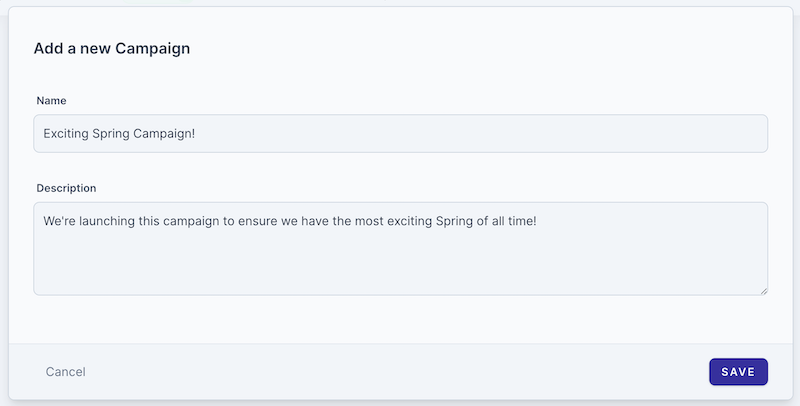
Campaigns have minimal configuration since their main purpose is organization and reporting.
Campaign Details
| Field | Required | Description |
|---|---|---|
| Name | Yes | A descriptive name for the campaign. Use a consistent naming convention for easy organization. |
| Description | No | Optional notes about the campaign, such as contract details, special requirements, or contact information. |
Tracking & Metrics
Campaigns aggregate metrics from all their ads, giving you a single view of performance.
Available Metrics
| Metric | Description |
|---|---|
| Impressions | Total number of times ads in this campaign were played to listeners. An impression is counted when the ad audio begins playing. |
| Companion Views | Number of times the companion image (banner) was displayed alongside the audio ad. Only counted for ads with companion images configured. |
| Companion Clicks | Number of times listeners clicked on the companion image. Requires a click-through URL to be configured on the creative. |

Reporting Tips
- Campaign metrics update in real-time as ads are delivered
- Use the date range filter to view performance over specific periods
- Export reports for sharing with advertisers or internal stakeholders
- Compare campaigns to identify top performers and optimize future sales
Next Steps
Once you've created a campaign, you'll need to add ads to it: