
Create and manage ad content
Creatives are the actual audio spots, images, and logos that make up your ads. Upload existing audio or use the AI-powered Ad Builder to create professional ads in minutes.
Overview
A Creative belongs to an Ad and contains the media assets—audio, companion images, and logos. Each Ad can have multiple Creatives that rotate according to the Ad's rotation settings.
Upload Audio
Upload existing audio files (MP3, WAV, OGG) from your production team or agency.
AI Ad Builder
Generate professional audio ads using AI. Just describe your business and we'll create the script and audio.
Dynamic Ads
Create personalized ads with variables that change at runtime based on context.
Visual Assets
Add companion banners and sponsor logos that display alongside your audio.
Creative Details
Basic information about your creative.
| Field | Required | Description |
|---|---|---|
| Name | Yes | Internal name for the creative (e.g., "Acme Summer Sale - 15s Version A") |
| Title Text | No | Display title shown to listeners (e.g., "From Our Sponsor") |
| Weight | No | Priority for weighted rotation (higher = more impressions). Default is 1. |
Audio Options
You have two ways to provide audio for your creative:
Option 1: Upload Audio File
Upload a pre-produced audio file from your production team or agency.
| Requirement | Specification |
|---|---|
| Formats | MP3, WAV, OGG |
| Max File Size | 5 MB |
| Max Duration | 5 minutes |
| Recommended | 128kbps MP3, 44.1kHz sample rate |
Option 2: Use the Ad Builder
Generate professional audio using AI. See the Ad Builder section below for details.
Interactive Ad Builder
The Ad Builder is an AI-powered tool that creates professional audio ads in minutes. Just describe your business and the AI will generate multiple script variations, then produce high-quality audio with voice and background music.
Step 1: Generate Ideas
Start by telling the AI about your business and the type of ad you want.
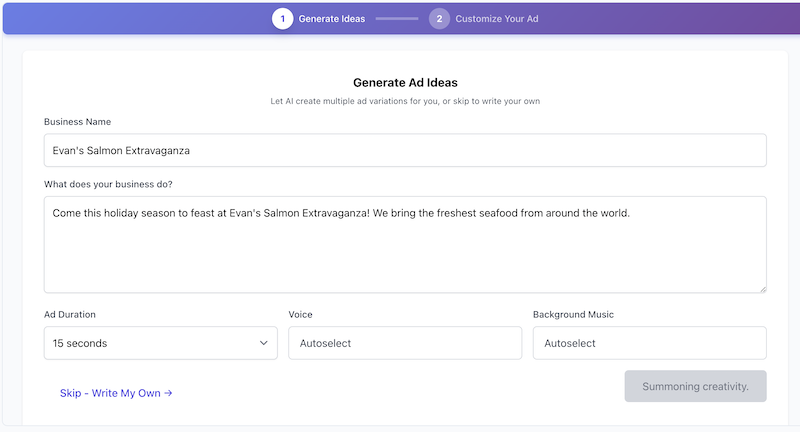
| Field | Description |
|---|---|
| Business Name | The name of the business or product being advertised |
| Business Description | Describe what the business does, its unique value, and what you want to promote |
| Ad Duration | Choose 15 seconds, 30 seconds, or 60 seconds |
| Voice | Select a specific voice or choose "Autoselect" to let the AI pick |
| Background Music | Select music or choose "Autoselect" for AI-selected music |
Click Generate and the AI will create multiple script variations with different styles (professional, friendly, urgent, etc.). Each variation is automatically converted to audio.
Step 2: Customize Your Ad
Review the generated ads and customize your favorite. You can:
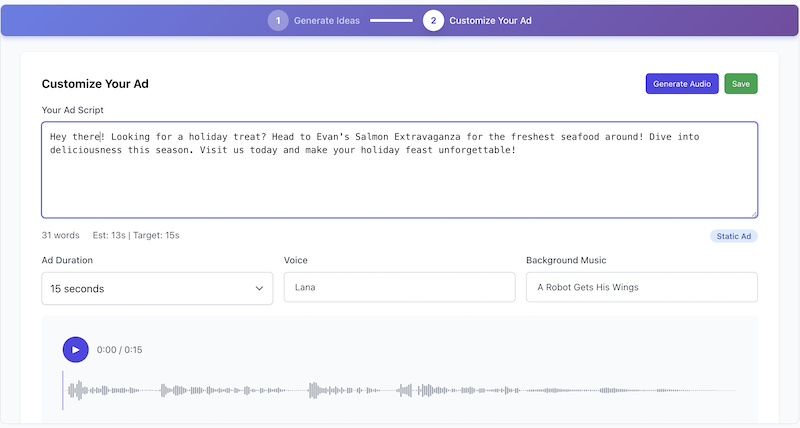
- Edit the script — Modify the text to match your brand voice
- Change the voice — Select a different voice from the library
- Change background music — Pick different music to set the mood
- Preview with waveform — Listen to your ad with visual playback
- Regenerate — Create a new version with your changes
Word Count Guidelines
The Ad Builder shows word count and estimated duration as you edit. Speech averages about 2.3 words per second.
| Duration | Target Words | Notes |
|---|---|---|
| 15 seconds | 30-40 words | Quick, punchy message |
| 30 seconds | 65-75 words | Standard radio spot length |
| 60 seconds | 150+ words | Full story or detailed message |
Dynamic Ads with Variables
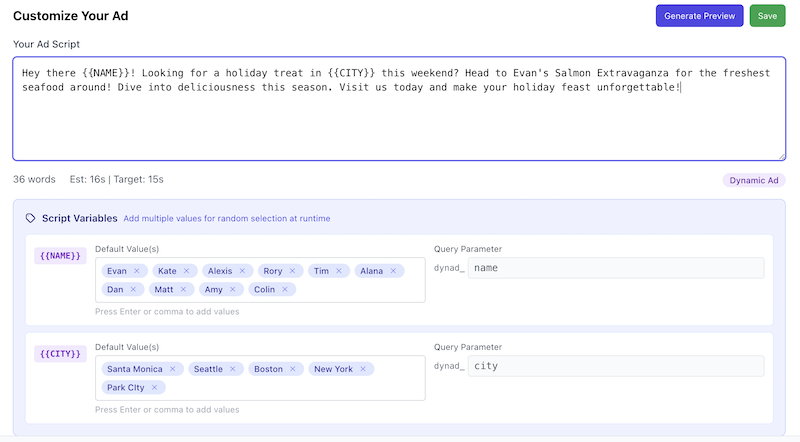
Dynamic ads contain variables that are replaced at runtime, allowing you to create personalized ads from a single creative.
Adding Variables
In the Ad Builder, use double curly braces to define variables in your script:
Welcome to {{BUSINESS_NAME}}! Right now, save {{DISCOUNT}} percent
on your entire order. Visit us at {{LOCATION}} today!When you add variables, a configuration panel appears below the script where you can set:
| Setting | Description |
|---|---|
| Variable Name | The name inside the braces (automatically detected) |
| Default Values | Comma-separated list of default values. One is randomly selected if no value is passed at runtime. |
Passing Variables at Runtime
Variables are passed as query parameters when the ad is requested. The parameter name is
dynad_ followed by the lowercase variable name:
// Example: Override BUSINESS_NAME and DISCOUNT
?dynad_business_name=TechCorp&dynad_discount=25Static vs Dynamic Ads
| Type | Description | When to Use |
|---|---|---|
| Static | Audio is pre-rendered and cached on CDN. Instant playback. | Standard ads without personalization |
| Dynamic | Audio is rendered on-demand with variable substitution. Slight latency. | Personalized ads (location, offers, names) |
Companion Images
Companion images (banners) display alongside your audio ad in the player interface. They provide visual reinforcement and can include click-through links.
Companion Image Settings
| Field | Description |
|---|---|
| Image | Upload a banner image (recommended: 300x250 or 728x90) |
| Click-Through URL | Where listeners go when they click the image |
| Alt Text | Accessibility description of the image |
Sponsorship Placements
Sponsorship ads have additional placement options for premium brand integrations.
Available Sponsorship Placements
| Placement | Description |
|---|---|
| Preroll | Audio plays before main content |
| Preamble | "Brought to you by" style message after preroll |
| Midpoint | Audio plays at the midpoint of content |
| Postroll | Audio plays after main content |
| Logo | Sponsor logo displayed in the player throughout playback |
Logo Configuration
For sponsorship ads, you can upload a logo that displays in the player for the duration of the content (not just during the ad).
| Field | Description |
|---|---|
| Logo Image | Upload sponsor logo (recommended: transparent PNG, max 200px wide) |
| Logo Click URL | Optional link when listeners click the logo |